 FutureBook
A short guide
Investing for children: a short FutureBook guide
FutureBook keeps who gave a gift, and why, beside investments set aside for a child. Broker connections are being prepared.
Meanwhile, these notes cover ETF basics and how a finished book looks and is shared.
1ETFs when investing for children
If the money can stay invested for many years, one broadly diversified equity ETF is a common starting point. It is a fund that holds shares in a great many companies. It is not the right choice for everyone, and nothing here is a promise about what happens next.
- Share prices can fall a long way. Money you expect to need soon may not belong in equities.
- What a fund did in the past does not say what it will do next.
- A global fund already includes many countries. A regional fund on top of it can buy some of the same markets again.
What the index names mean
- FTSE All-World and MSCI ACWI
- Large and mid-sized companies in developed and emerging markets.
- MSCI World
- Large and mid-sized companies in developed markets only. Emerging markets are left out.
- S&P 500
- About 500 large companies in the United States. A large-cap slice of the U.S. market, not every U.S. company and not a whole continent.
- MSCI Europe
- Large and mid-sized companies in developed European markets.
- STOXX Europe 600
- 600 large, mid-sized and smaller companies across 17 European countries.
- MSCI Emerging Markets
- Large and mid-sized companies in emerging markets, across several regions rather than one country.
How to compare a fund
justETF is a site for looking up and comparing ETFs. A fund listed there is not a recommendation, and the largest fund is not automatically the one most people hold.
- Index: which markets the fund follows.
- Ongoing charge: the fund’s yearly cost, on the issuer’s page and on justETF.
- Fund size: a very small fund can later be closed. Size is not a popularity contest.
- Share class: accumulating or distributing.
- Past performance: notice the period and the currency of the chart. It is history, not a forecast.
2Add the story behind the gifts
Open the book from My books. This is where you add the people and the occasions. Nothing here is written for you.
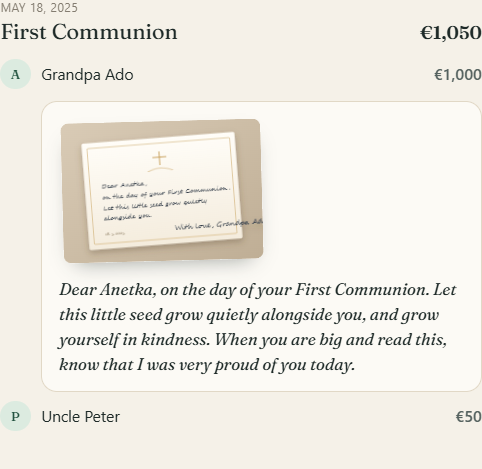
What the child sees in the sample book: a card and a message next to the person who gave them. Select the image to open it larger. - Under Moments, choose Add moment. An occasion is optional. You can also set the day the money was received.
- Under Investments, open a confirmed investment and choose Add contributor. Enter who gave it. A message for the child is optional and is shown in the book.
- File the contributor under a moment, or leave it on the investment date.
- Choose Card, then Add a photo of the card. The child’s page shows the first photo next to that person’s message.
- A private note stays on your page. It is not shown in the child’s book.
- When you synchronize later, new orders appear under Review new investments. They are not added until you choose them.
3Preview and share
The child’s page is a private link, not a public listing. Search engines are asked not to index it.
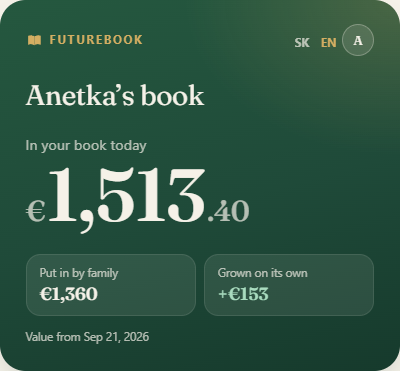
The first screen of the sample book. A real child’s page looks like this, without the sample-data bar. Select the image to open it larger. - Before you have a book, Help and then Sample book opens an example. That example is not your child’s page.
- After the book exists, open it from My books. Under Private link, The child’s page opens the real page in a new tab.
- Copy puts that address on the clipboard.
- Anyone with the full link can view the page. They cannot change it, and they do not sign in to FutureBook or Trading 212.
- You manage the book only while signed in with Google.
- If the link was shared too widely, choose Create a new link. The old one stops working.